It never leaves your iPhone.
Hushtrove has no servers, no ads and no analytics. Everything you add is encrypted on your iPhone, with keys only your iPhone holds.
- Encrypted before it's saved
- Every photo, video, file and note gets its own AES-256 key the moment it arrives.
- Locked to this iPhone
- Your passcode is combined with a secret from the Secure Enclave, the chip that also protects Face ID. A copy of the vault can't be cracked on another computer.
- Invisible in Files
- The vault never appears in the Files app, in Photos or in iPhone backups.
- Your iCloud, if you want it
- Backups go to your own private iCloud, already encrypted. Apple can't read them, and neither can we.
The vault is free, with no limits.
Hide as many photos, videos and files as your iPhone can hold. No subscription, no storage caps.
-
Move photos out of your library
Pick photos and videos, and once they're safely in the vault, Hushtrove offers to delete the originals from Photos.
-
Files and scanned documents
Add PDFs and documents from the Files app, or scan paper straight into the vault.
-
A camera that skips your Camera Roll
Photos and videos you take inside Hushtrove go directly into the vault.
-
Face ID
Open the vault with a glance. If someone adds a new face to your iPhone, the vault asks for your passcode again.
-
Search that stays on your iPhone
Find photos by what's in them and documents by the words inside. All of it runs on your iPhone.
-
Location removed
Strip location and camera details from photos when you import them and when you share them.
-
Albums and favorites
Organize everything into albums. Deleted items wait in Recently Deleted for 30 days.
-
Locks when you leave
Auto-Lock closes the vault after you leave the app, and the app switcher only ever shows a blank cover.
How your files are protected.
From the moment you add a photo to the moment it's backed up, it's never readable outside the vault.
Forgot your passcode?
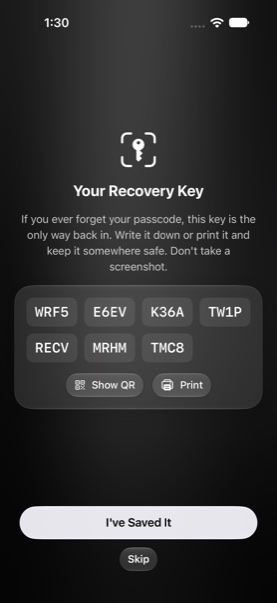
When you set up Hushtrove, you get a 28-character Recovery Key. It's the only way back in without your passcode.
We can't reset it for you, because we never have it.
-
You choose a passcode
It's never stored anywhere, not even on your iPhone.
-
Your iPhone turns it into a key
Deliberately slowly, and mixed with a secret from the Secure Enclave, so guessing takes ages and only works on your iPhone.
-
Every item gets its own key
Your passcode unlocks the vault, and each photo, video, file and note inside has a separate random key.
-
Encrypted in small pieces
Items are sealed with AES-256 in small chunks. Any tampering is detected, and videos play without ever being saved unencrypted.
-
Backed up only if you choose
With iCloud backup on, the already-encrypted pieces are uploaded under random names to your private iCloud.
Pay once. Keep it forever.
Hushtrove Pro is a single purchase, not a subscription. It adds:
-
Encrypted iCloud backup
Back up and sync to your own iCloud, encrypted before it leaves your iPhone. Restore on a new iPhone with your passcode.
-
Decoy vault
A second passcode opens a separate, harmless vault.
-
Intruder selfie
Quietly photographs anyone who enters the wrong passcode, and logs when it happened.
-
Panic lock and disguise
Flip your iPhone face down to lock instantly, and swap the app icon for a calculator, weather or utilities icon.
-
Screenshot shield
Your photos stay blank in screenshots and screen recordings.
-
Auto-wipe
Destroys the keys on this iPhone after too many wrong passcodes.
-
Save from any app
Send photos and files to the vault from the Share menu, even while it's locked.
-
Secure notes
Encrypted notes for codes, passwords and private thoughts.
What Hushtrove can't do.
Privacy tools should be clear about their limits. These are ours.
- Deleted photos stay in Recently Deleted for 30 days. That's an iOS rule no app can skip. Empty Photos › Recently Deleted to remove them for good.
- Screenshot shield can't stop a second camera. It blanks screenshots and recordings, but someone could still photograph your screen.
- The decoy vault fools people, not forensic labs. It holds up against someone looking through your phone, not against specialist analysis of its storage.
- A lost passcode and Recovery Key can't be undone. If you lose both, nobody can open your vault. Not us, not Apple.
Questions.
Can you see what I put in the vault?
No. Hushtrove has no servers and no account system, so nothing you add ever reaches us. The keys that decrypt your vault exist only on your iPhone, and in your iCloud Keychain if you turn on backup.
Is it a subscription?
No. The vault is free with no limits. Hushtrove Pro is a one-time purchase that adds the extras above.
What happens if I delete the app?
Deleting the app deletes the vault on that iPhone. If iCloud backup was on, reinstall Hushtrove, tap Restore from iCloud and enter your passcode or Recovery Key.
How do I move to a new iPhone?
Turn on iCloud backup on your old iPhone. On the new one, install Hushtrove, tap Restore from iCloud and enter your passcode. Your Recovery Key works too.
Does it work without internet?
Yes, completely. Hushtrove only goes online to buy Pro through the App Store and, if you turn it on, to back up to your iCloud.
Which iPhones does it work on?
Any iPhone that runs iOS 26 or later.